


How Can We Help?
How to access the XauZit Cloud Customer Portal
This article describes how to access the XauZit Cloud Customer Portal.
Log in to the Customer Portal
To log in to the Customer Portal, follow these steps:
- Use your web browser to go to https://my.cloud.xauzit.com/.
- Under Manage Your Account, click Secure Client Login:

The login page appears:
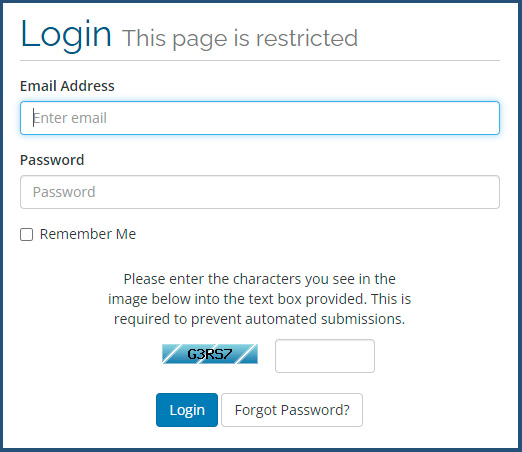
- In the Email Address text box, type the e-mail address associated with your XauZit Cloud account.
- In the Password text box, type your account password.
- If you want to have the browser remember your login credentials the next time you access the Customer Portal, select the Remember Me check box.
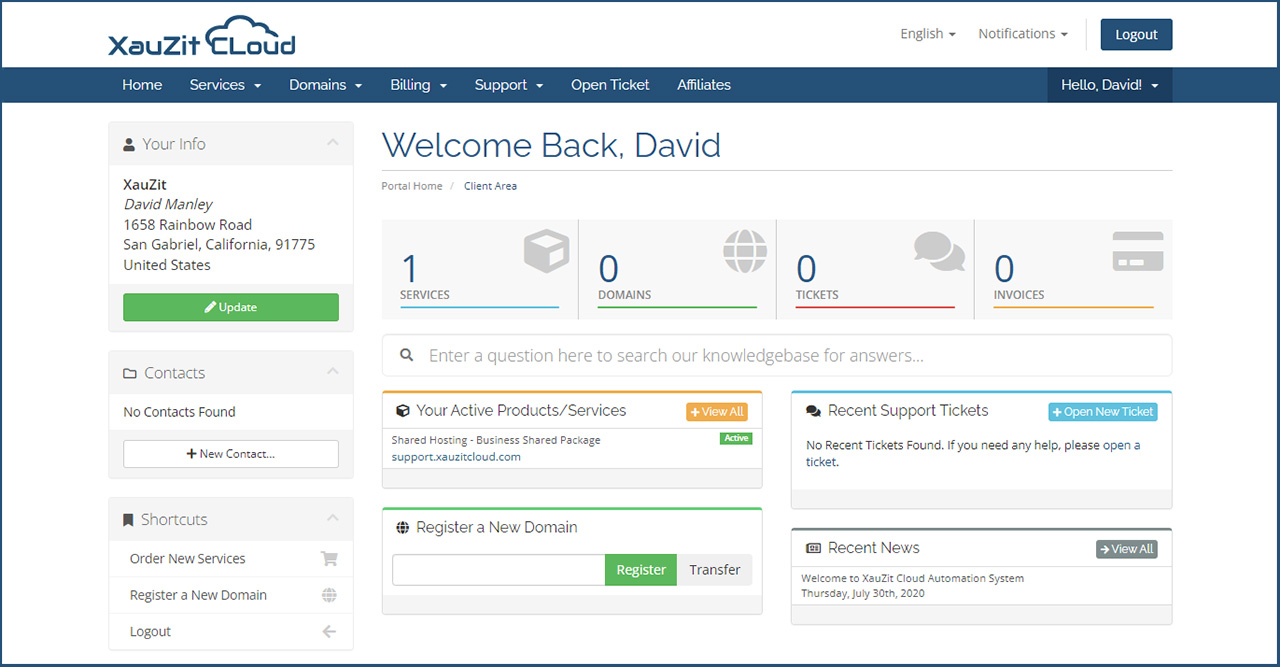
- Click Login. The main client area appears:
Log out of the Customer Portal
To log out of the Customer Portal, follow these steps:
- On the top menu bar, click LOGOUT. The Customer Portal logs you out:

Did you find this article helpful? Then you’ll love our support. Experience the XauZit Cloud difference today and get a pre-secured, pre-optimized website. Check out our web hosting plans today.