



How Can We Help?
How to manage WebHost Manager packages
This article describes how to use WebHost Manager (WHM) packages. Packages are collections of predefined settings that WHM uses when you create an account. For example, as a reseller you could create “Basic” and “Premium” packages. The “Basic” package might have relatively small quotas for disk space and bandwidth transfer, while the “Premium” package has higher limits.
After you have created at least one package, you can create an account.
Creating a package
To create a new package in WebHost Manager, follow these steps:
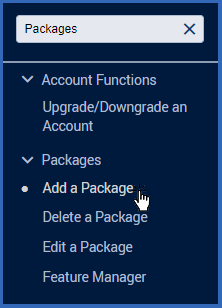
- In the search box at the upper left of the WHM screen, start typing package, and then under Packages, click Add a Package when it becomes visible:
- In the Package Name text box, type a name for the package. For example, you could create settings for a basic account and name the package Basic.
- Under Resources, set quotas and limits for the various options.